
The 6 Best AI Sourcing Tools Right Now

Leverage your Interview Data
AI interview notes, scorecard, follow-up, ATS integration, and more...
.svg)
.svg)
Recruiters sruggle these days because sourcing has become too manual.
AI sourcing tools help solve this problem.
In this guide, you’ll discover the best AI sourcing tools available today.
1. Noota Taalent
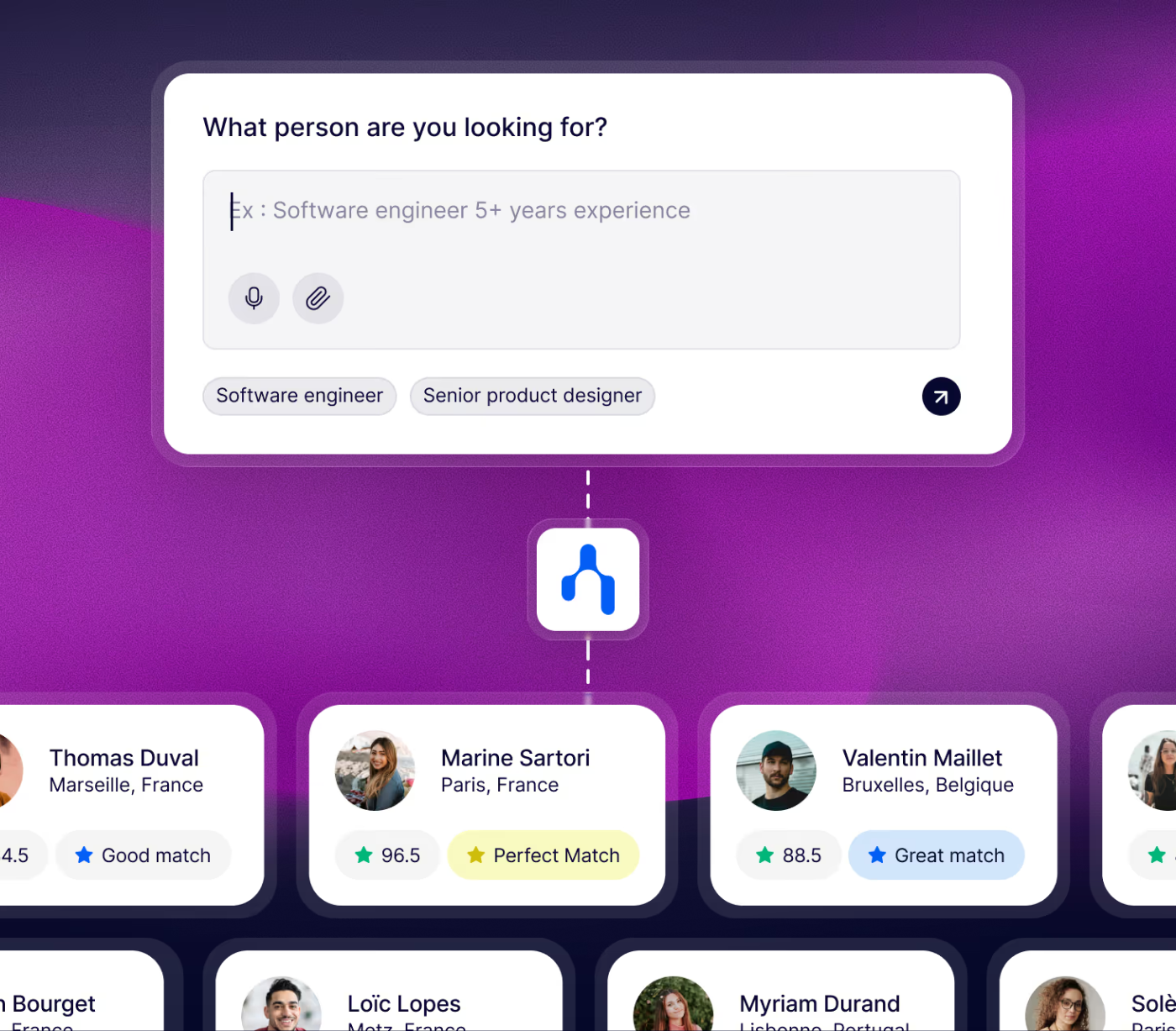
Noota Taalent is a full AI sourcing platform built to help you move from a hiring need to a qualified shortlist faster.
Instead of asking your recruiters to jump between sourcing tools, Noota Taalent connects these steps into one unified structured workflow.
Features
Noota Taalent is designed around AI agents that automate all the steps of sourcing :
You can use it to:
- Clarify the hiring need by creating a structured role brief and evaluation criteria.
- Source candidates automatically based on the profile you are looking for.
- Score and prioritize profiles using the criteria defined during intake.
- Launch outreach campaigns to contact candidates and move them forward.
- Run structured prequalification before recruiters spend time on full interviews.
- Generate interview reports from candidate conversations.
- Compare candidates side by side using structured scorecards.
- Sync candidate data with your ATS so your team avoids manual updates.
Channels and database
Taalent sources among a database of 800M+ profiles from a variety of channels and websites (Linkedin, Github, job boards, social media). It also provides outreach across channels such as email, LinkedIn, SMS, and other candidate communication channels.
TRY NOOTA TAALENT FOR FREE HERE.
2. Juicebox

Juicebox is also an AI sourcing platform designed to help you find candidates with simple, natural language prompts.
Juicebox turns your request into a candidate search and gives you matching profiles from its talent database.
Features
Juicebox’s main strength is speed.
With it, you can:
- Search candidates with natural language instead of Boolean strings.
- Review AI-ranked profiles based on your hiring criteria.
- Create projects to organize candidates by role.
- Access candidate contact details using contact credits.
- Generate outreach emails with AI templates.
- Export candidates to CSV, PDF, or, on higher plans, directly to your ATS or CRM.
- Use talent insights to understand locations, skills, tenure, and market patterns.
Channels and database
Juicebox says it searches across 800M+ profiles and 30+ data sources.
Juicebox documentation says it requests contact data from providers such as ContactOut and RocketReach, then verifies emails through Kickbox.
Price
Juicebox has public pricing, which makes it easier to compare with other AI sourcing tools.
Its pricing page lists:
- Free: entry-level access.
- Starter: $139 per seat/month.
- Growth: $199 per seat/month.
- Business: custom pricing.
The Starter plan includes unlimited searches, 250 email contact credits, 250 export credits, up to 3 active projects, email outreach, and AI templates.
3. GoPerfect
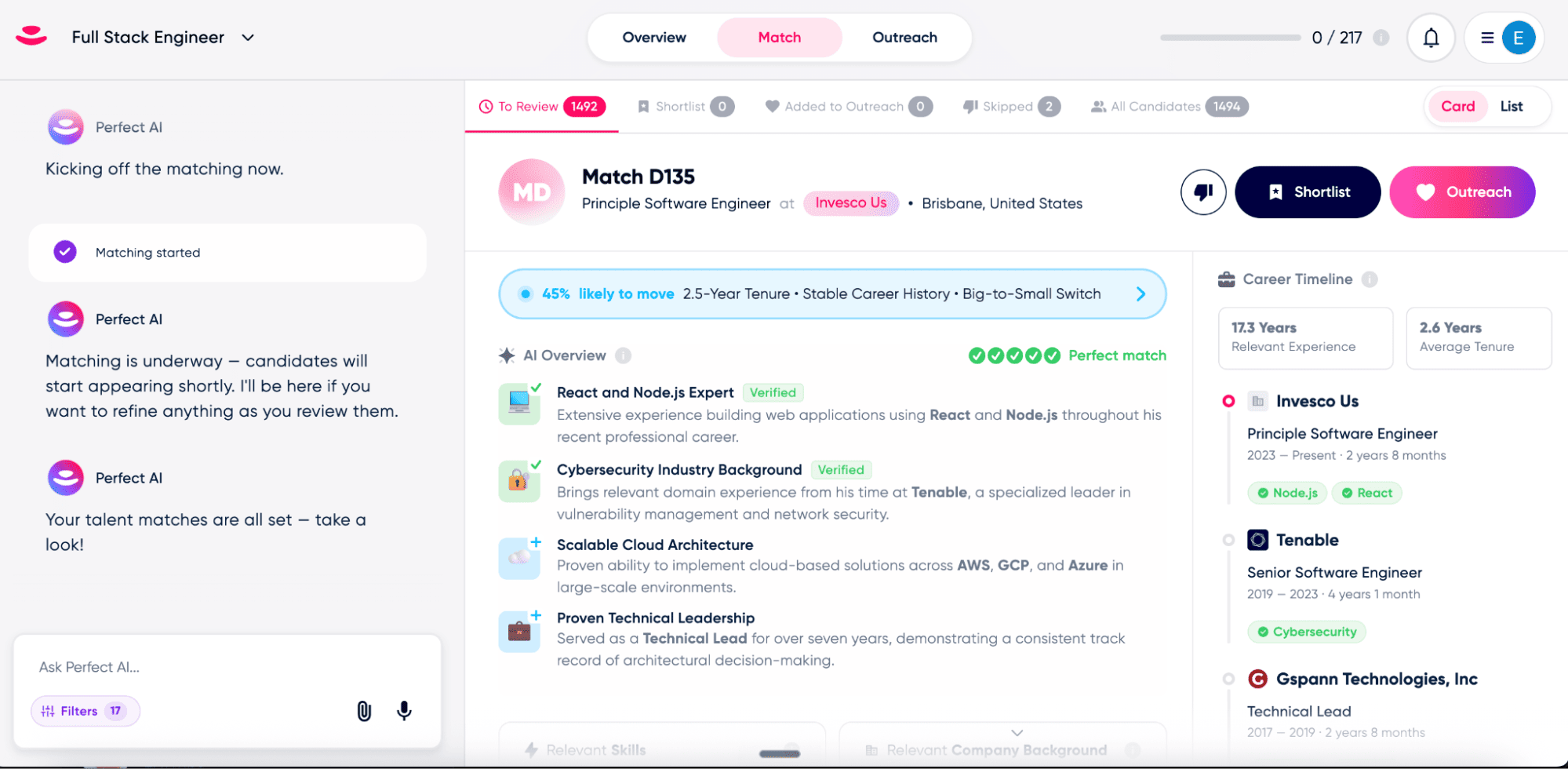
GoPerfect is an AI sourcing platform that focuses more specically on outreach features.
It is built for teams that want to reduce the manual work behind outbound hiring.
Features
GoPerfect focuses on three important parts of recruiting: finding candidates, ranking them, and getting them to reply.
With it, you can:
- Source candidates with AI based on your role requirements.
- Screen and score resumes to prioritize stronger matches.
- Create automated outreach sequences instead of writing every message from scratch.
- Contact candidates through LinkedIn and email.
- Connect GoPerfect with your ATS to reduce manual updates.
- Manage sourcing workflows for multiple open roles.
Channels and database
GoPerfect’s outreach is built around two core channels: LinkedIn and email. It also relies on a large database of sourcing channels.
Price
GoPerfect does not show a simple self-serve price on the pricing page reviewed.
Instead, its pricing page invites teams to book a demo.
The Starter plan is described for growing teams filling 5–15 roles per month, while the next tier is aimed at scaling teams with 5–20 recruiters.
4. SeekOut

SeekOut is an AI sourcing platform built for teams that need a large talent database, advanced search filters, and stronger candidate intelligence. SeekOut uses AI-powered search to understand context.
Features
SeekOut is designed for structured, high-volume sourcing.
You can use it to:
- Search external talent pools with AI-powered candidate search.
- Find passive candidates who are not actively applying.
- Use Boolean or natural language queries depending on your recruiter’s search style.
- Apply advanced filters for skills, location, education, certifications, security clearance, programming languages, patents, publications, and more.
- Rediscover candidates in your ATS instead of always starting from scratch.
- Source from websites with a Chrome extension.
- Evaluate inbound applicants with AI and produce qualified shortlists.
- Send personalized outreach to engage candidates at scale.
- Connect with your ATS to bring sourcing activity into your existing workflow.
Channels and database
Its public pages mention access to 1B+ profiles and AI-powered search across sources such as LinkedIn and GitHub.
GitHub activity, open-source contributions, patents, and publications can reveal candidate expertise that standard resume keywords often miss.
Price
SeekOut now gives more public pricing information than many enterprise sourcing tools.
Its pricing page says SeekOut Recruit starts at $833 per month for enterprise teams. It also says SeekOut Spot pricing is custom based on your hiring needs and role types.
SeekOut also offers a 14-day free trial for Recruit Lite.
According to the same pricing page, the trial includes:
- 500 contact credits.
- 1,000 exports.
- 14 days of access.
- No credit card requirement.
- No contract commitment.
5. hireEZ

hireEZ is not only a candidate database. It combines AI sourcing, resume screening, talent intelligence, recruiting CRM features, and analytics in one platform.
Features
hireEZ is designed for recruiters who want to combine sourcing, matching, engagement, and analytics.
With it, you can:
- Source candidates with AI across the open web and your ATS.
- Use EZ Agent to identify and rank qualified candidates.
- Screen resumes faster with AI-powered review.
- Rediscover past candidates already stored in your ATS.
- Manage candidates in a recruiting CRM.
- Automate engagement workflows with outreach campaigns.
- Use talent intelligence to understand your market.
- Track performance through recruiting analytics.
Channels and database
hireEZ focuses on sourcing from multiple platforms and connecting that sourcing work with candidate engagement. It scans profiles from multiple sources and builds lists of best-fit candidates based on keywords or job requirements.
Price
hireEZ does not clearly publish standard self-serve pricing on its main website.
Most buyers need to contact sales for a quote.
Third-party pricing sources estimate that hireEZ plans often start around $169 to $199 per user per month, with higher tiers moving above $250 per user per month depending on seats, credits, modules, and contract terms.
FAQ
What is an AI sourcing tool?
An AI sourcing tool helps your recruiters find, rank, and contact candidates faster.
Instead of manually searching through LinkedIn, job boards, databases, and old ATS records, your team can describe the profile it wants. The tool then searches candidate data, identifies relevant profiles, and helps your recruiters decide who to contact first.
Most AI sourcing tools can support tasks such as:
- Finding passive candidates.
- Matching profiles to job requirements.
- Enriching candidate contact details.
- Writing personalized outreach.
- Ranking candidates by fit.
- Reusing profiles already stored in your ATS.
This does not mean the tool makes the hiring decision for you.
It simply helps your team reduce repetitive sourcing work and focus more time on candidate conversations.
What is the best AI sourcing tool?
The best AI sourcing tool depends on your hiring process.
For example, Noota Talent helps automate the recruitment workflow across sourcing, screening, interviews, hiring reports, and decision-making. Its help center describes it as a platform built to automate sourcing, screening, interviews, and hiring workflows in one place.
So your choice depends on your bottleneck.
Ask yourself:
- Do you need more candidates?
- Do you need better-qualified candidates?
- Do you need better outreach?
- Do you need structured screening?
- Do you need interview notes and scorecards?
- Do you need ATS updates without manual work?
If you only answer the first question, a sourcing tool may be enough.
If you answer yes to several of them, you should look for a more complete AI recruiting workflow.
Can AI sourcing tools replace recruiters?
No.
AI sourcing tools can automate parts of recruitment, but they should not replace your recruiters.
They can help your team search faster, summarize candidate profiles, draft outreach, and identify patterns in your pipeline. But your recruiters still need to define the role, understand hiring manager expectations, evaluate motivation, build trust with candidates, and make judgment calls.
That human role matters even more when AI is used in hiring.
SHRM has highlighted that AI can reshape how recruiters understand talent and connect candidates to roles, but it also requires careful navigation of risks and limitations.
In practice, AI works best as an assistant.
Your recruiters stay responsible for the process.
The tool helps them move faster.
Are AI sourcing tools safe to use?
They can be safe, but only if your team uses them responsibly.
AI recruiting tools can create risks around bias, transparency, data privacy, and candidate experience. The EEOC has warned that employers may still be responsible if an AI selection tool creates adverse impact, even when the tool comes from an outside vendor.
So before using any AI sourcing platform, your team should check:
- How the tool ranks candidates.
- What data it uses.
- Whether candidates can be reviewed manually.
- How the vendor monitors bias.
- Whether the tool supports your compliance requirements.
- Whether recruiters can override AI recommendations.
You should also avoid using AI as a black box.
If your team cannot explain why a candidate was rejected, shortlisted, or ranked highly, your process may become harder to defend.
What features should you look for in an AI sourcing tool?
You should look for features that improve your real hiring workflow, not just features that sound impressive.
Start with your biggest pain point.
If your recruiters spend hours searching, prioritize candidate database quality and AI matching.
If your reply rates are low, prioritize personalization and outreach sequences.
If your team struggles after the first call, prioritize screening, interview notes, and scorecards.
The most useful features usually include:
- A large and fresh candidate database.
- AI matching based on role requirements.
- Contact enrichment.
- Email or multichannel outreach.
- Candidate scoring.
- ATS integration.
- Reporting and analytics.
- Human review at key decision points.
The goal is not to automate everything.
The goal is to remove low-value manual work so your recruiters can spend more time with the right candidates.
Are AI sourcing tools worth it?
Yes, if sourcing is slowing down your hiring process.
They are especially useful when your team hires for hard-to-fill roles, manages several open positions, or spends too much time switching between tools.
But the ROI depends on adoption.
If your recruiters use the tool only as another database, the value may be limited.
If they use it to improve sourcing, outreach, screening, documentation, and follow-up, the impact can be much stronger.
A good AI sourcing tool should help your team build better pipelines, reach candidates faster, and make your hiring process more consistent.
Leverage your Interview Data
AI interview notes, scorecard, follow-up, ATS integration, and more...

Jean-marc is an AI expert helping recruiters & professionnals leverage these tools in their everyday work.
Related articles
.webp)
.png)

Forget manual sourcing and screening.
try Taalent now
FAQ
In the first case, you can directly activate recording as soon as you join a videoconference.
In the second case, you can add a bot to your videoconference, which will record everything.
Taalent also enables you to translate your files into over 30 languages.


.svg)