
Ashby Review & Alternatives
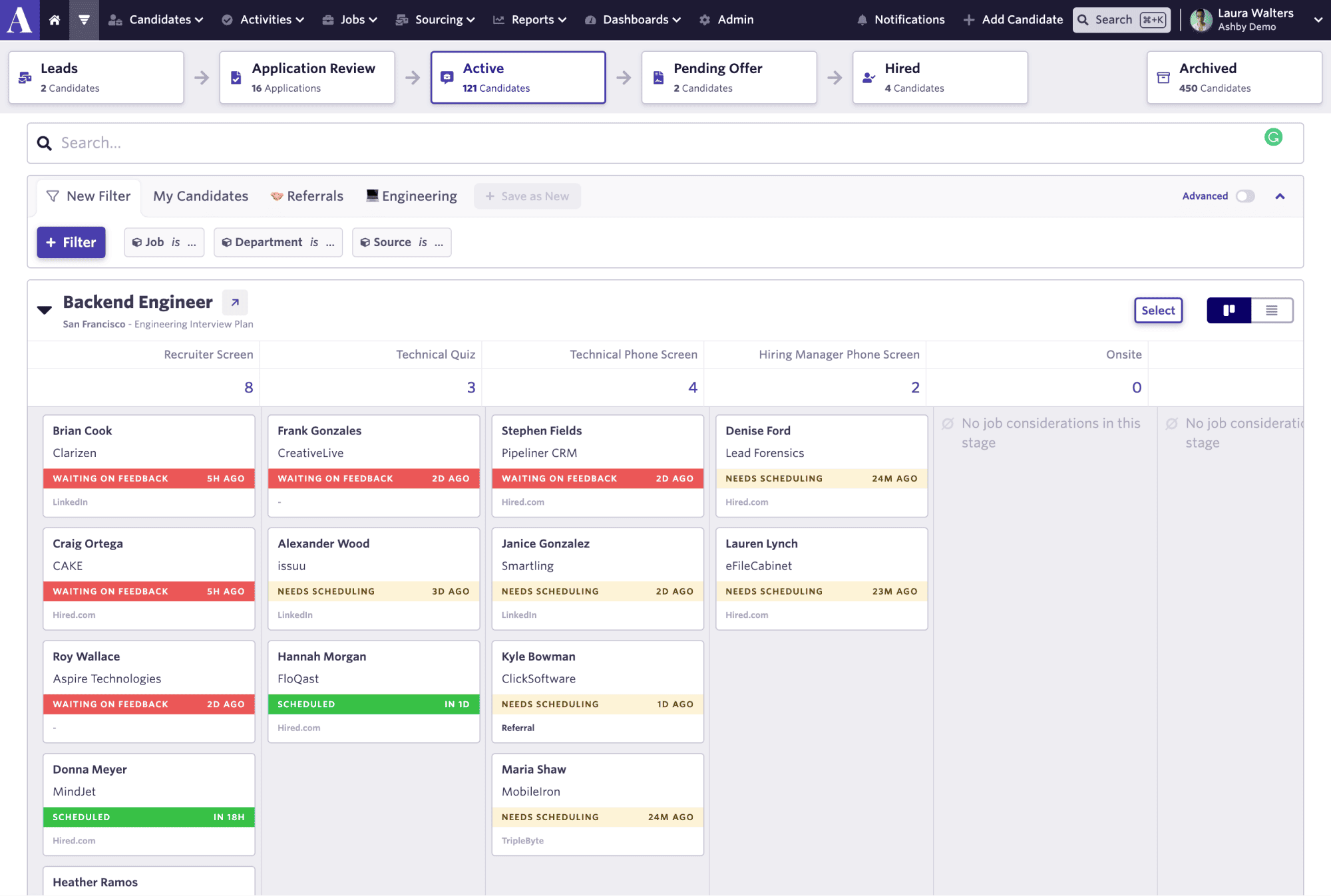
Leverage your Interview Data
AI interview notes, scorecard, follow-up, ATS integration, and more...
.svg)
.svg)
Ashby is a modern recruiting platform that combines applicant tracking, CRM and sourcing, scheduling, analytics, automation, and AI in one system.
But is Ashby the right fit for your hiring workflow, or would another tool help your team move faster?
In this review, we’ll look at:
- Ashby ATS features.
- Ashby ATS pricing.
- What users say about Ashby.
- The best Ashby alternatives.
Ashby Features
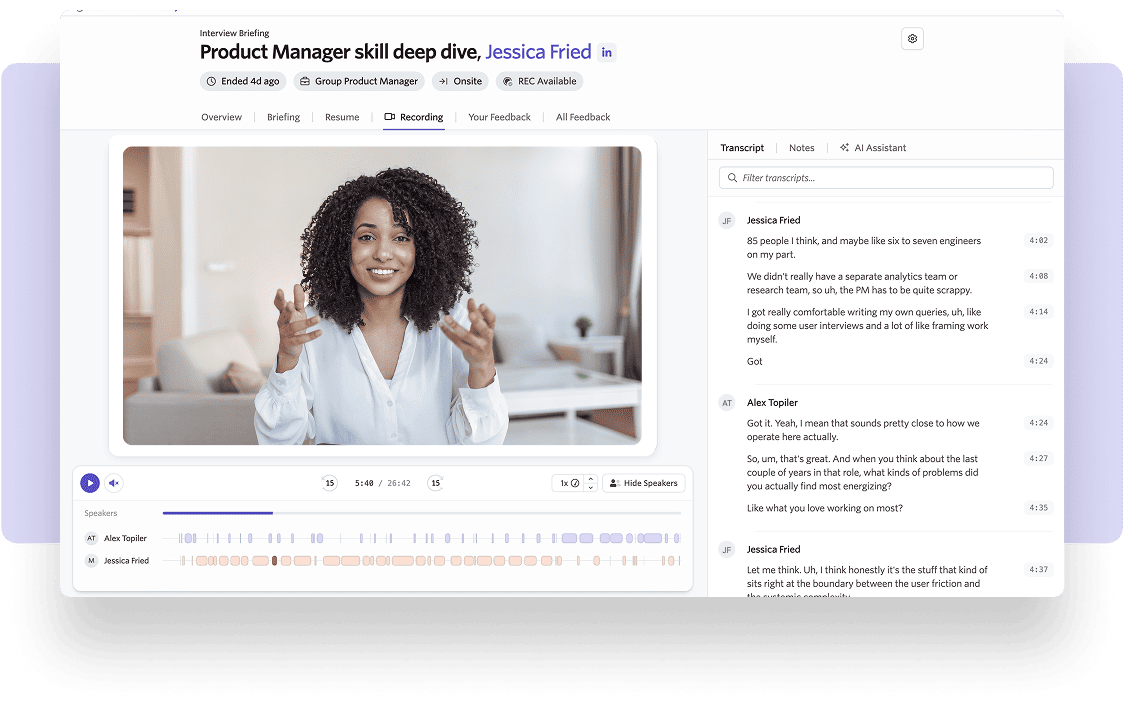
Ashby is an all-in-one recruiting platform with features designed for teams that want more than a basic applicant tracking system.
Applicant tracking
Ashby’s ATS helps your team manage candidates through each stage of the hiring process.
You can structure pipelines, review applications, manage interviews, track candidate progress, and keep hiring teams aligned. Ashby’s official ATS page says the product is built to give teams more visibility, efficiency, and structure while letting them design their own recruiting process.
CRM and sourcing
Ashby also includes CRM and sourcing features. With Ashby, your team can manage both applicants and prospects in the same recruiting system.
That helps you avoid separating inbound and outbound hiring into different tools.
Scheduling
Interview scheduling is another core Ashby feature.
Instead of managing availability through long email threads, your team can use scheduling workflows to coordinate candidates, interviewers, and hiring panels.
Analytics and reporting
Analytics is one of Ashby’s strongest features.
Many ATS tools help you track candidates.
Ashby goes further by giving recruiting teams deeper visibility into funnel performance, source quality, hiring speed, conversion rates, and team activity.
G2 review summaries highlight Ashby’s reporting and analytics as recurring strengths, with users praising its intuitive reporting and data visibility.
This is useful if your talent team wants to answer questions like:
- Which sourcing channels produce the best candidates?
- Where do candidates drop off?
- Which roles are moving too slowly?
- How long does each hiring stage take?
- Which hiring managers need faster feedback?
AI features
Ashby also offers AI features across the recruiting workflow.
Its AI page says the platform helps teams use AI from sourcing to debriefs across its all-in-one recruiting platform.
Ashby has also introduced AI-assisted application review to help teams manage inbound application volume more efficiently.
Ashby ATS Pricing
Ashby’s official pricing page now shows a starting price of $400/month for its All-In-One plan, with a 10% discount available for annual commitments. It also mentions emerging market pricing and asks larger teams to “get in touch,” especially for more advanced or enterprise needs.
This means Ashby is closer to a premium recruiting platform for teams that want ATS, CRM, sourcing, scheduling, analytics, automation, and AI in one system.
Your final price may depend on:
- Company size.
- Hiring volume.
- Number of users.
- Products selected.
- AI and sourcing needs.
- Contract length.
- Implementation and support requirements.
Third-party pricing sources also suggest that Ashby costs can vary depending on company size, headcount, add-ons, and contract terms. Vendr notes that Ashby pricing varies widely based on factors like company size, headcount, contract term, and add-ons, while other third-party sources mention starting prices around $360–$400/month.
Ashby ATS User Review
Ashby gets strong reviews from many recruiting teams, especially teams that care about analytics, automation, and modern workflows.
What users like about Ashby
Users often praise Ashby for three main reasons.
1. Strong reporting and analytics
This is one of the most common strengths.
Recruiting teams like that Ashby gives them more visibility into hiring performance. Your team can track pipeline health, conversion rates, source performance, and hiring progress without relying only on spreadsheets.
For a Head of Talent or recruiting operations lead, that level of reporting can be a major reason to choose Ashby.
2. Modern user experience
Many users describe Ashby as cleaner and easier to use than older ATS tools.
Capterra reviews mention positive experiences with posting jobs, tracking candidates, managing hiring phases, and navigating the platform. One review summary highlights a strong team experience using Ashby to post jobs and track candidates through different hiring stages.
This matters because ATS adoption depends on daily usage.
3. All-in-one workflow
Users also value that Ashby combines ATS, CRM, scheduling, analytics, and automation in the same platform.
This can reduce tool switching.
Your recruiters can manage applicants, prospects, interviews, and reporting without jumping between too many systems.
What users dislike about Ashby
Ashby’s biggest weakness is also linked to its strength.
It is powerful.
But power can create complexity.
G2 review summaries mention a learning curve, feature complexity, and complex setup as recurring cons. Some users find the platform overwhelming at first, especially when their role is not fully dedicated to recruitment. (
This means Ashby may require time to configure properly.
Your team may need to define workflows, train users, set up reports, and decide which automations matter.
For a mature recruiting team, that setup effort can be worth it.
For a small team hiring occasionally, it may feel heavy.
Pricing is another concern.
Ashby’s official pricing page shows pricing from $400/month for the All-In-One plan, and larger teams are asked to contact sales. That can make Ashby harder to compare if your team wants a quick, low-cost ATS decision.
Ashby Best Alternatives
Ashby is a strong ATS if your team wants analytics, customization, sourcing, scheduling, and recruiting operations control in one platform.
But it is not the only option.
1. Noota Taalent
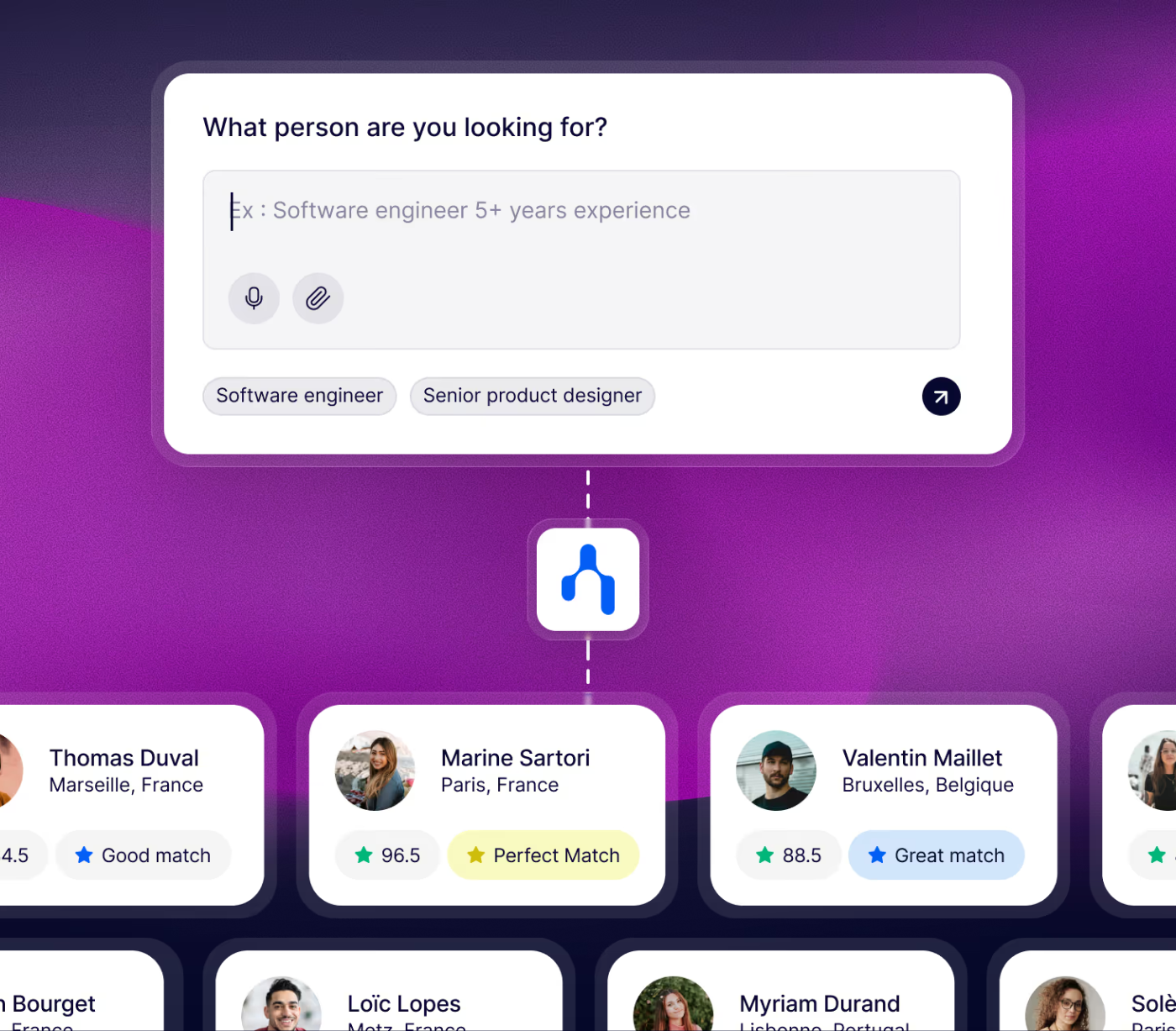
Noota Taalent is a strong alternative if your team wants to improve the recruiting work around your ATS.
Ashby is mainly a full recruiting platform.
Noota Taalent is different. It helps automate the operational work that slows recruiters down: intake, sourcing, screening, interviews, candidate reports, scoring, and ATS synchronization. Noota’s help center describes Noota Talent as a platform that automates sourcing, screening, interviews, and hiring workflows in one place.
This makes it especially useful if your team already has an ATS but still struggles with manual work.
With Noota Taalent, you can:
- Define the hiring need.
- Structure role criteria.
- Source candidates.
- Run prequalification.
- Generate interview reports.
- Score candidates.
- Sync evaluation data with your ATS.
Noota’s workflow connects job definition, sourcing, screening, interviews, and decision-making in one system. The goal is to reduce disconnected tools and help recruiters focus on evaluating candidates instead of managing admin.
Choose Noota Taalent if your biggest pain is not applicant tracking itself, but the manual work around candidate evaluation.
2. Greenhouse
Greenhouse is one of the strongest Ashby alternatives if your team wants structured hiring at scale.
It is more than a basic ATS. Greenhouse positions itself as a hiring platform with ATS, AI recruiting tools, structured hiring, candidate experience, scalable workflows, and interview decision-making features.
Greenhouse is a good fit if your team wants:
- Structured hiring workflows.
- Interview kits and scorecards.
- Strong process governance.
- AI-assisted recruiting.
- A large integration ecosystem.
- Enterprise-ready recruiting operations.
Choose Greenhouse if you want a mature ATS that helps standardize hiring across teams.
It may be less ideal if your team wants a lighter setup or more flexibility without heavy process configuration.
3. Lever
Lever is a good Ashby alternative if your team wants ATS and CRM in one platform.
Lever describes itself as modern recruiting software that combines applicant tracking and recruiting CRM capabilities, helping companies attract, nurture, and hire talent faster.
This makes it especially useful for teams that care about long-term candidate relationships.
With Lever, your team can manage inbound applicants and outbound prospects in the same system. Its pricing page highlights ATS and CRM in one platform, with sourcing, nurturing, hiring, reporting, and automation in a unified workflow.
Choose Lever if your team wants to build talent pipelines, nurture prospects, and manage relationship-based recruiting.
4. Workable
Workable is a better fit if your team wants a practical ATS that is easier to adopt.
It offers recruiting and HR features for companies that want to find, hire, and manage talent without building a complex recruiting operations system. Workable says it is trusted by 30,000+ companies across 100+ countries.
Its pricing page also offers a free trial, which can make evaluation easier for smaller teams.
Choose Workable if your team wants:
- Job posting.
- Applicant tracking.
- Simple hiring workflows.
- HR features.
- Faster setup.
- A broader HR platform.
It may not match Ashby’s analytics depth, but it can be easier to deploy.
FAQ
Is Ashby a good ATS?
Yes, Ashby is a strong ATS for teams that want a modern, data-driven recruiting platform.
It is especially useful if your team needs applicant tracking, sourcing, CRM, scheduling, analytics, automation, and AI in the same system. Ashby describes itself as an all-in-one recruiting platform with ATS, CRM and sourcing, scheduling, analytics, and AI embedded across the workflow.
This makes it a good fit for growing teams that want more visibility and control over hiring operations.
But it may be too advanced if your team only needs a simple tool to post jobs and track applicants.
How much does Ashby ATS cost?
Ashby’s official pricing page lists its All-In-One plan from $400/month, with a 10% discount available for annual commitments. The same page says larger teams can contact Ashby for the Plus plan and mentions emerging market pricing.
Your final cost may depend on your company size, hiring volume, selected features, contract terms, and user setup.
So if your team is evaluating Ashby, you should treat $400/month as a starting point, not always the final price.
What are Ashby’s main features?
Ashby combines several recruiting features in one platform.
Its main features include:
- Applicant tracking.
- Recruiting CRM.
- Candidate sourcing.
- Interview scheduling.
- Recruiting analytics.
- Workflow automation.
- AI recruiting features.
Ashby says its AI features can support the recruiting process from sourcing to debriefs, while its sourcing and CRM page highlights AI-powered sourcing, multi-step outreach sequences, and CRM functionality.
That makes Ashby more complete than a basic ATS.
It is built for teams that want to manage both applicants and prospects in one recruiting system.
What do users like about Ashby?
Users often like Ashby’s reporting, clean interface, and all-in-one workflow.
Capterra describes Ashby as an all-in-one recruiting platform that integrates applicant tracking, analytics, scheduling, and CRM in one solution. It also notes that the platform supports structured hiring processes and custom reporting for data-driven decisions.
In practice, this means your team can track candidates, manage workflows, and review hiring performance without relying only on spreadsheets.
That is one of Ashby’s biggest strengths.
What are Ashby’s main drawbacks?
Ashby can feel complex for teams that do not need advanced recruiting operations.
Because it combines ATS, CRM, analytics, sourcing, scheduling, automation, and AI, your team may need time to configure it properly.
Pricing can also be a consideration.
If your team wants a very lightweight or low-cost ATS, Ashby may be more than you need.
A public Reddit discussion also mentions frustration around Ashby renewal pricing and elevated seat charges, but this should be treated as anecdotal feedback, not a universal experience.
Who is Ashby best for?
Ashby is best for growing companies that want a modern recruiting platform with strong analytics and workflow control.
It is a good fit if your team wants to:
- Track candidates in a structured ATS.
- Manage outbound sourcing and CRM.
- Automate recruiting workflows.
- Schedule interviews.
- Analyze hiring performance.
- Use AI inside the recruiting process.
It may be less ideal if you hire only a few people per year or want the simplest ATS possible.
What are the best Ashby alternatives?
The best Ashby alternative depends on your main problem.
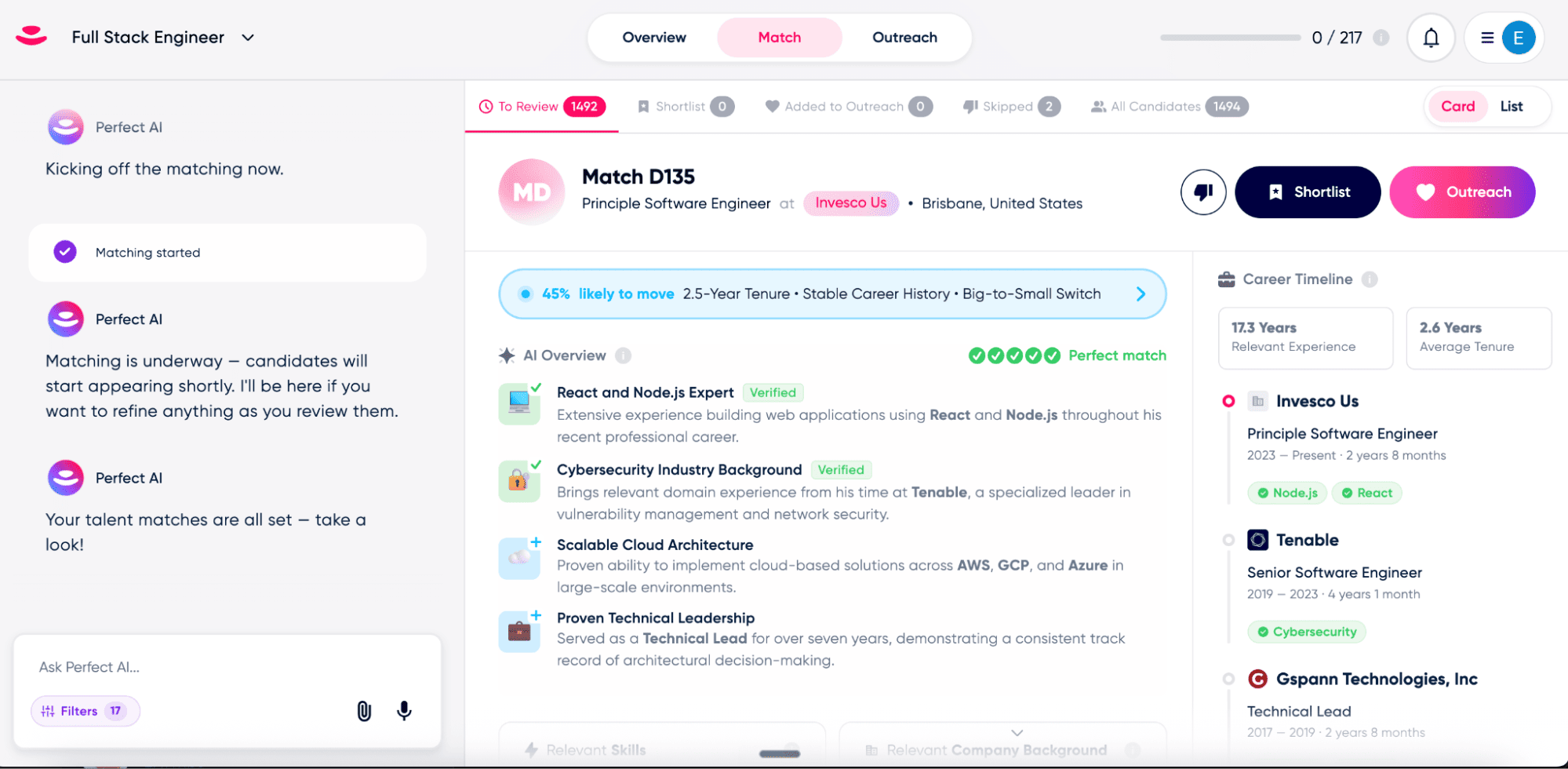
If you want AI recruiting automation around sourcing, screening, interviews, scorecards, and ATS sync, Noota Taalent is a strong option. Noota Taalent connects sourcing, screening, interviews, reporting, and decision workflows in one system, and can sync candidate data, reports, and evaluation results with your ATS.
If you want a full ATS, compare Greenhouse, Lever, Workable, Teamtailor, or SmartRecruiters.
Leverage your Interview Data
AI interview notes, scorecard, follow-up, ATS integration, and more...

Jean-marc is an AI expert helping recruiters & professionnals leverage these tools in their everyday work.
Related articles
.webp)
.png)

Forget manual sourcing and screening.
try Taalent now
FAQ
In the first case, you can directly activate recording as soon as you join a videoconference.
In the second case, you can add a bot to your videoconference, which will record everything.
Taalent also enables you to translate your files into over 30 languages.


.svg)